Getting Software Done: Feeding and Managing Our System
In the previous posts (part 1 and part 2) we saw how to organize our work and regain focus in order to be more productive with less stress. We learned about the concept of a “Messy Mind” and how to empty our heads of tasks by putting them into a trusted system.
We also looked at how to organize our system with lists, how to avoid urgent mode by reviewing our system frequently, and how to manage our system.
Now, in this third part, we are going to see how to feed our system with tasks to do and how to manage our time to be more productive.
Feeding Our System
In the world of software development, we are used to receiving tasks from different sources: email, Slack, JIRA… From all of them we can extract tasks that will go into our Inbox. But to do that, we need to review all of them.
That’s why I propose the method called Inbox Zero.
Inbox Zero
Inbox Zero was designed to work with and organize your tasks directly from email. But as we mentioned, email is not our only source—we have others as well.
The idea is to apply the Inbox Zero method to all of these sources.
But be careful: Inbox Zero is not about having your email/Slack at zero at all costs, nor about always reading messages as soon as they arrive. That would take a huge amount of time and effort, and would also lead to constant interruptions.
Inbox Zero is about making email/Slack work for us, not the other way around. To do this, we need to review our input channels at specific times. For example, I usually check my email and Slack when I start my workday, and then again when I change context: when I finish a task and start another, or when I lose focus after a couple of hours of work.
When I review them, I apply the following rules:
- If it’s something I can do in less than 2 minutes, I do it.
- If it’s something I can’t do in less than 2 minutes but I do need to do, I add it to my Next Actions.
- If it’s something that’s not for me, I delegate it. If I need to keep an eye on it, I add it to Waiting for.
- If it’s something I don’t need to do, I delete it or archive it.
- If it’s something I need for future reference, I add it to my Reference Material.
- If it’s something I need to do at a specific time, I add it to my Calendar.
- If it’s something I’m waiting for another person/team/client to do, I add it to my Waiting for.
- If it’s something I want to do at some point, but not now, I add it to my Maybe/Someday.
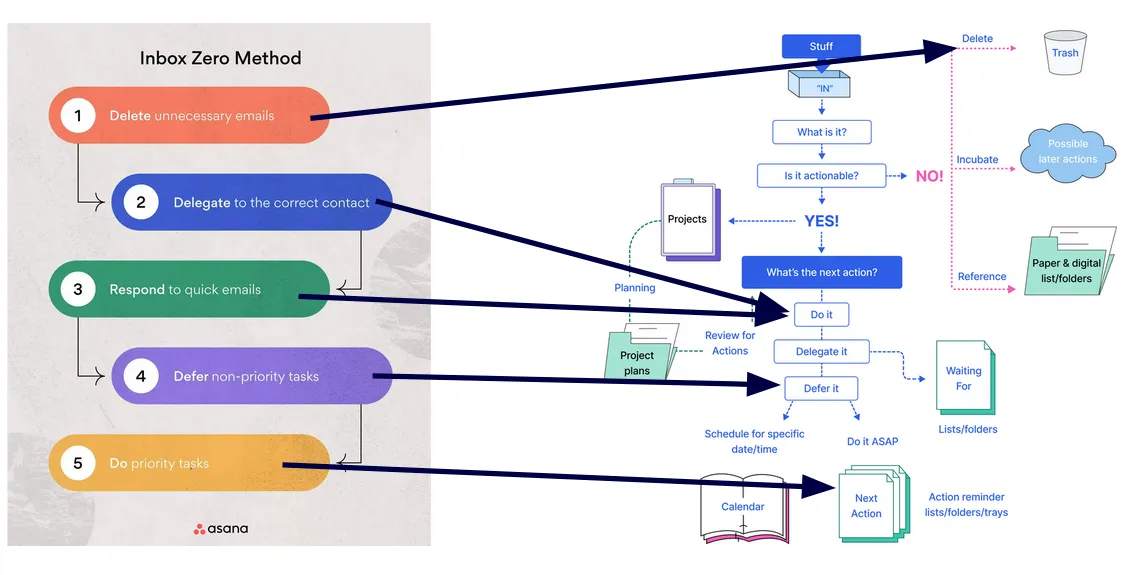
As you can see, I’m applying the lists from our system to organize incoming tasks, so that nothing ever slips
through the cracks. Here’s an image showing the relationship between Inbox Zero and our GTD system:
Managing Our Time
Once our system is up and running, it’s time to manage our time to be more productive. There are countless techniques for this, but I’m going to talk about two that I really like.
Parkinson’s Law
Parkinson’s Law states that “work expands so as to fill the time available for its completion.” In other words, if we have a task to do and we give ourselves 2 hours to do it, that task will take 2 hours. But if we give ourselves 30 minutes, that same task will take 30 minutes.
This allows us to “play” with our brain by using realistic but tight deadlines.
Imagine you have a task that you know will take 2 days, but you’re given 1 week to do it. Most likely, you’ll use those extra 5 days to work on the task, even if you don’t really need them. On the other hand, if you’re given 3 days to do it, with one extra day as a buffer for unexpected issues, you’re much more likely to focus and finish it in those 3 days, leaving two days free to do other things.
This is extremely useful for managing our time, as it helps us be more efficient. If we have a task to do, we can give ourselves a limited amount of time to do it, preventing it from expanding unnecessarily.
Timeboxing
Timeboxing is a technique that consists of dividing our time into blocks dedicated to specific tasks. For example, we might dedicate 2 hours to working on a specific task, then 30 minutes to checking email, then 1 hour for a meeting…
This allows us to take control of our time and avoid distractions. It also helps us be more productive, since we know exactly what we’re supposed to be doing at any given moment.
It’s a way to fight procrastination, because having a limited amount of time to work on a task makes it more likely that we’ll focus on it and finish it. It also helps us maintain a balance between work and rest, since we can schedule breaks between work blocks.
Conclusion
We’ve learned about the concept of a “Messy Mind” and how to get tasks out of our head and into a trusted system. We’ve seen how to organize our system with lists, how to avoid urgent mode by reviewing our system frequently, how to manage our system, and how to feed our system with tasks. Finally, we’ve seen how to manage our time using Parkinson’s Law and Timeboxing.
But the most important thing of all is to use your mind for what really matters: thinking, creating, and solving problems. And to reach such a level of trust in your system that when night comes, just before going to sleep, and someone asks you: “What do you have to do tomorrow?” you can answer without fear: “I don’t know, and I don’t care,” because your system knows it for you.