Getting Software Done: The GTD System
In the previous post we saw that humans are not good at storing tasks in our brains. This is because our brain is very limited.
The best way to organize our tasks is with a system that allows us to manage them efficiently, taking them out of our minds and putting them into a trusted system where we can access them whenever we need.
This allows us to free our mind and focus on what we are doing at each moment.
To achieve this, there are several systems that help us manage our tasks efficiently. One of them is the system proposed by the book Getting Things Done, or GTD.
The GTD System
GTD proposes an organization divided into lists. These lists contain different elements. Let’s take a look at them:
Inbox
This first list stores everything that comes to your mind and makes you think, “I need to look at this later.” And when I say everything, I mean everything. Are you in a meeting and realize you’ll have to do a task? Inbox. Are you reviewing emails/messages/pull requests and notice things you’ll need to take care of? Inbox. Are you walking down the street and come up with a great idea you’d like to work on? Inbox.
The Inbox will be the starting point of our system.
Projects
This is where the projects you are working on live, along with their associated smaller tasks. It’s important not to lose focus on what you’re actually doing, and this list helps with that. For example, working on the login feature of your application can be considered a project.
Next Actions
These are the small tasks we will do as soon as possible (but without stressing ourselves out). They are tasks related to the projects we have in our projects list. Following the previous example, if one of your projects is building the application login, here you would have the small actions required to achieve it: create the login button, create the form, etc.
One peculiarity of this list is that the tasks included depend solely on us and are actionable at any time.
Waiting For
This list may seem strange, but it is very powerful. In our day-to-day life, we wait for events that are not under our control: we’re waiting for a pull request to be approved, waiting for another team to respond to our request, waiting for a confirmation email… We wait for “things” that we don’t know when will happen. All of them belong on this list.
Calendar
Just as we wait for things that we don’t know when will happen, we also wait for events that we do know when will happen. The clearest example: a meeting. Meetings have a date and time.
But not only meetings, there can be other types of tasks that must happen at a specific moment: notifying the team on Thursday morning about a certain topic, doing a deployment first thing Monday morning, publishing documentation on the agreed date… All of this deserves to be on the Calendar.
Maybe / Someday
Let’s be honest, how many times have you said, “Someday…”? And that day never comes. “Someday I’ll refactor all this”; “Someday I’ll build that app I thought of”; “Someday…” And in the end, it’s forgotten.
Well, instead of that, add it to this list. You might do it, or you might not, but it will always be present in your system, and you will be the one who decides whether to let it go or move it into action.
Reference Material
Many times, in order to perform our small actions, we need some context or documentation. Even more often, what happens is that we waste time searching for that documentation. This list is designed precisely for that: a place to store reference material that can help us carry out our actions.
For example, imagine you’re building a REST API that uses filters following OData syntax. Those filters follow a very strict syntax documented in a specific part of the OData specification. Instead of searching for that documentation every time you need to work with filters, you can keep it in this list.
A very good rule of thumb to know whether you have what you need at hand is: If you can find it in less than 2 minutes, you have it.
All these lists together make up the GTD system. But how do we manage it? How do we make all of this work?
Avoid Urgent Mode
We all know someone who spends the entire day sighing in the office because of the amount of things they have to do. They’re constantly running from one place to another, with no time to do absolutely anything because they have too much on their plate. They live in a constant urgent mode.
It’s very easy to be seduced by this urgent mode, where you only deal with surprises and crises, especially if you have a lot of disorganization on your desk, in your email… and in your mind.
To avoid all of this, we need to do something that seems obvious at first, but that we tend to forget: Review the system.
Review Your System
To avoid urgent mode, it’s necessary to keep the system under control. To do that, the system needs to be reviewed continuously. During this review, you reorganize the lists in your system. You mark as completed what you’ve finished; you move actions that are waiting on an event to Waiting For and remove from Waiting For those that are no longer blocked; you remove calendar events that have already happened… In short, you update your system.
GTD suggests doing this review weekly. But don’t go crazy with it, adapt the frequency to your needs. For example, I review it every 2 weeks. Why? Because my team works with 2-week sprints, so the review fits more naturally. What’s important is that you review it regularly.
By reviewing the system frequently, what we achieve is a sense of peace and calm that allows us to be more productive. It’s a feeling we’ve all experienced at some point.
Surely you’ve had a stressful moment with your team where there were many things to do. Suddenly, someone says: “Let’s write everything down in a to-do list so we don’t forget anything.” After that, you see everything more clearly, with more perspective, and you may even say: “Oh, it’s not that much.” That’s the feeling I’m talking about!
Let me give you another example. Imagine those well-earned vacations are approaching, 2 or 3 weeks where you’re going to disconnect 100%. But you’re a professional, so you want to leave everything you have pending closed and organized, either by making it clear which tasks are finished or by handing them off to someone else. This process takes you a full day. But you leave for your vacation feeling calm and at ease.
Now let me ask you: why not do that same thing every so often, say, every week or two? That way, you can have that good feeling more frequently, and the time required to do the review will be much smaller because, with frequent reviews, it’s far less likely for the system to get badly out of sync.
How to Manage Our System
We’ve already seen a proposal of lists for our system. We also know that we need to review it frequently. But what we’re missing is how to actually manage it, how tasks move between the lists.
Since a picture is worth a thousand words, here’s the GTD proposal:
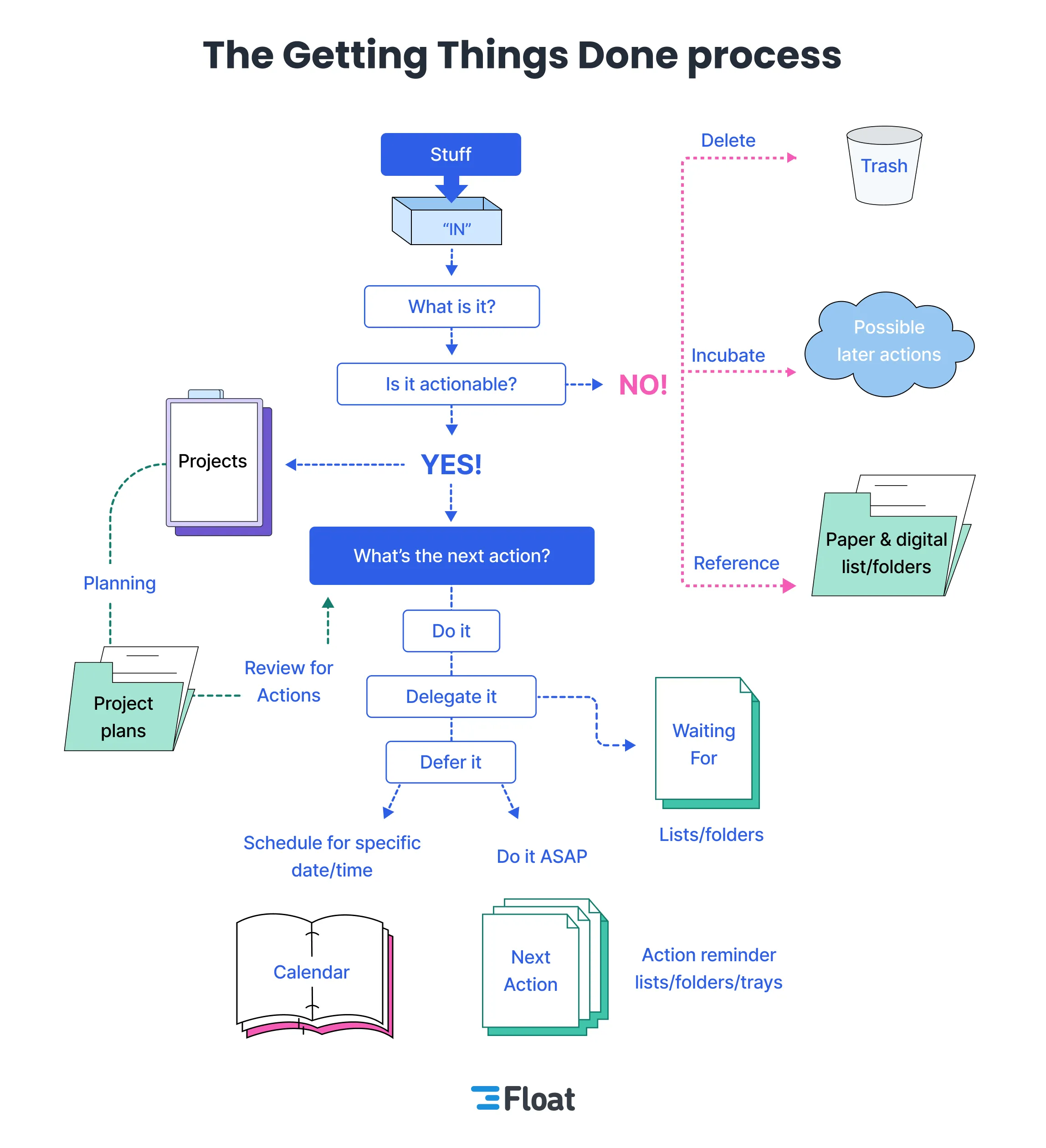
The idea is simple. Everything that comes into our mind goes into the Inbox. Then, during the system review, we take tasks out of the Inbox and classify them into the different lists as appropriate.
For example, if it’s a task we can do in less than 2 minutes, we do it. If it’s a task we need to do but not right now, we add it to Next Actions. If it’s something we’re waiting for someone else to do, we add it to Waiting For… And so on.
Don’t underestimate the power of the 2-minute rule. Many times, we have small tasks that we can complete in under 2 minutes, but we leave them for later. This causes our Next Actions list to fill up with small tasks that we could have done quickly: replying to an email or Slack message, approving a very simple 2-line PR… That’s why it’s important to take advantage of those moments to knock out small tasks.
We now have an example of how to manage our system. But how do we do this in our day-to-day work? In the next post, we’ll see how to feed our system and manage our time to be more productive.